Mastering Revenue Recognition Principles in Excel

At its core, revenue recognition principles are the specific accounting rules that dictate when and how a business can record its income in a financial model. Think of them as the grammar of financial reporting, ensuring every company speaks the same language when it comes to reporting earnings. This standardized approach ensures revenue is recorded when it is earned, not just when cash changes hands.
Understanding the Core of Revenue Recognition in Your Spreadsheets

Let's say you run a custom furniture business and track your orders in Excel. A client pays you upfront for a large dining table. Do you count that entire payment as revenue the moment the cash hits your account? According to revenue recognition principles, the answer is a firm no. You actually earn that revenue as you complete the work—sourcing the wood, building the table, and finally, delivering it. In Excel, you'd use separate columns to track the order date, payment date, and delivery date to correctly time your revenue entry.
Spending too much time on Excel?
Elyx AI generates your formulas and automates your tasks in seconds.
Sign up →This framework, primarily guided by the ASC 606 and IFRS 15 standards, was established to iron out inconsistencies and give everyone a clearer, more honest look at a company's financial performance. It levels the playing field, making financial statements more reliable and comparable. The impact has been massive; some studies found that roughly 52% of public companies changed how they timed their revenue after adopting ASC 606.
Why These Principles Matter for Your Financial Models
Following these rules isn't just about ticking a compliance box; it's about financial integrity. Proper revenue recognition paints a true picture of a company's health, which is critical for a few key reasons:
- Investors and Lenders: They need accurate revenue figures from your financial models to judge profitability and risk.
- Internal Management: Leadership teams rely on accurate data for solid forecasting and budgeting in tools like Excel. This is where AI assistants in Excel can help automate complex calculations.
- Regulatory Compliance: It’s about meeting legal requirements and avoiding the headache of penalties or financial restatements.
To really get a handle on this, it helps to start with the definition of revenue. The central idea is to perfectly match the timing of your revenue with the moment you actually deliver goods or services. It's a simple but powerful concept that keeps businesses from inflating their performance by booking revenue too early. Before we jump into the five-step model, understanding this "why" is absolutely key to building accurate financial reports in Excel.
The Journey to a Unified Global Standard
For a long time, figuring out when to book revenue was a complete mess. There wasn't one single playbook. Instead, businesses had to navigate a tangled web of rules that changed depending on their industry. A software company had its own set of guidelines, a construction firm had another, and a retailer had yet another.
This created a huge headache. Trying to compare the financial health of two companies was like comparing apples and oranges. A similar deal could be reported in wildly different ways, which left investors scratching their heads and made financial analysis a guessing game.
This patchwork system just couldn't keep up with how business was changing. Modern deals involving bundled services and subscription models didn't fit neatly into the old boxes. As business became more global, it was clear something had to give.
The evolution of revenue recognition principles has been a slow burn over decades, starting with early attempts at guidance like the Financial Accounting Standards Board’s (FASB) SFAC No. 5 way back in 1984. That early framework set a simple-sounding rule: recognize revenue when it's both realized and earned. If you're curious, you can explore more about the history of these standards and how they've changed.
From Vague Rules to a Clear Mandate
One of the biggest problems with the old guidance was its reliance on a fuzzy idea called the "risks and rewards" model. In theory, it made sense: a company should recognize revenue once it had transferred the significant risks and rewards of owning something to the buyer.
But in practice? It was a nightmare of subjectivity. What exactly counted as "significant" risk? When were the rewards really "transferred"? The answer could change from one accountant to the next, which led to inconsistent reporting. This ambiguity opened the door for earnings management, making it tough for anyone to get a straight answer on a company's performance.
The Rise of a Unified Framework
Seeing the chaos, the U.S.-based Financial Accounting Standards Board (FASB) and the International Accounting Standards Board (IASB) teamed up. They had a massive goal: create one single, comprehensive standard that would work for every industry, everywhere.
The result of that massive effort was ASC 606 (Revenue from Contracts with Customers) for U.S. GAAP and its nearly identical twin for the rest of the world, IFRS 15.
The big shift with ASC 606 and IFRS 15 was moving away from the hazy "risks and rewards" idea to a much sharper principle: the transfer of control. This simple but profound change gave everyone a more objective and consistent way to recognize revenue.
This infographic paints a clear picture of the journey from a tangle of rules to a single global standard.
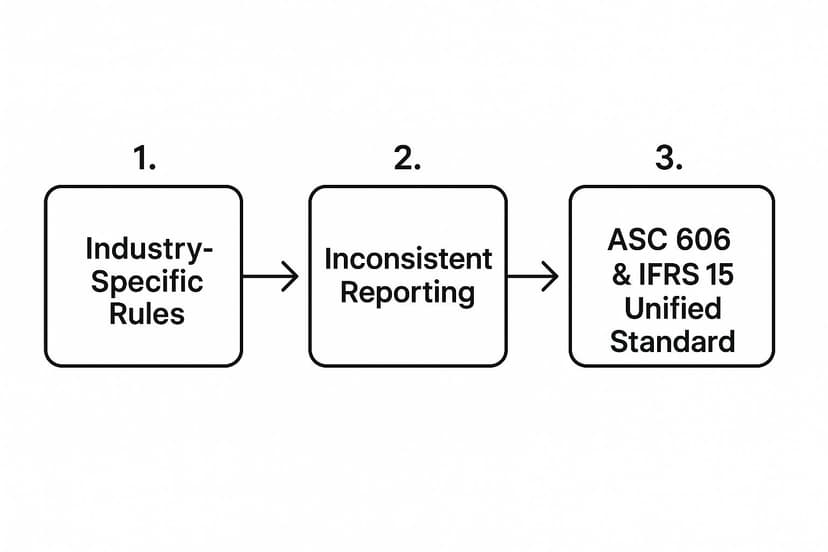
As you can see, a fragmented system was bound to create inconsistent reporting, which pushed regulators toward a single framework. Under this new standard, revenue is recognized when a customer gets control of a good or service. This means the customer can now direct its use and get all the benefits from it. This straightforward criterion is the foundation of modern revenue recognition and the five-step model businesses use today.
Applying the Five-Step Model for Revenue Recognition in Excel

The global standards ASC 606 and IFRS 15 have given businesses a single, reliable roadmap for recognizing revenue. This five-step model cuts through the fog of old, industry-specific rules, creating a consistent framework that ensures revenue is reported correctly, no matter what you sell. You can build this entire model within Excel to track and automate your revenue streams.
To see how it works in practice, let's follow a software company, "InnovateTech," that uses an Excel spreadsheet to manage its contracts. They sign a $15,000 contract with a new client, which includes a one-year software license and a one-time installation service.
Let's break down exactly how InnovateTech should account for this revenue using the five steps in their spreadsheet.
Step 1: Identify the Contract with the Customer
First, do we have a legitimate contract? This is more than just a signed document. The agreement needs to meet a few key criteria, which you can track using a simple checklist in Excel for each contract.
A contract is valid once all these boxes are checked:
- Approval and Commitment: Both sides have agreed to the terms.
- Identifiable Rights: Everyone’s rights and responsibilities are clearly defined.
- Payment Terms: The payment details are locked in.
- Commercial Substance: The deal changes the company's future cash flows.
- Collection is Probable: You're reasonably certain you're going to get paid.
In our scenario, InnovateTech has a signed agreement detailing the software, the service, and the $15,000 price. Both parties are on board, and after a quick credit check, InnovateTech is confident the client will pay. A valid contract exists.
Step 2: Pinpoint the Separate Performance Obligations
Next, break the contract down into its individual promises, or performance obligations. A promise is "distinct" if the customer can benefit from that good or service on its own. In your Excel sheet, you would list these as separate line items associated with the main contract.
Think of it like buying a new phone. The phone itself is one promise, and an extended warranty could be another. They are distinct.
InnovateTech's deal has two clear promises:
- The Software License: The core product the customer can use.
- The Installation Service: A separate action to get the customer up and running.
Since the client could use the software without the installation, and the installation is a standalone service, InnovateTech has two separate performance obligations.
Step 3: Determine the Total Transaction Price
Time to figure out the total cash you expect to collect. This is the transaction price. It's usually straightforward, but you have to watch out for things like discounts or rebates, which can make the final number a moving target.
For InnovateTech, things are simple. The contract specifies a fixed price of $15,000. This value would be entered into a "Total Contract Value" cell in their Excel tracker.
Step 4: Allocate That Price Across the Obligations
Now we have our total price ($15,000) and our list of promises. The next step is to divide that total price between the promises based on their standalone selling price—what you’d charge for each item if sold separately. You can use Excel formulas to automate this allocation.
The goal here is to assign a fair value to each part of the deal. This prevents companies from gaming the system by assigning most of the value to the first thing they deliver just to book revenue faster.
InnovateTech looks at its price list:
- The software license normally sells for $14,000.
- The installation service is sold on its own for $6,000.
The total standalone value is $20,000 ($14,000 + $6,000). To allocate the $15,000 contract price fairly, InnovateTech calculates the percentage each part represents:
- Software License: $14,000 / $20,000 = 70%
- Installation Service: $6,000 / $20,000 = 30%
Then, they apply these percentages to the actual $15,000 price in Excel:
- Allocated to License:
=0.70 * 15000which equals $10,500 - Allocated to Installation:
=0.30 * 15000which equals $4,500
Step 5: Recognize Revenue as Each Obligation Is Met
The final step is booking the revenue. You can only recognize revenue when (or as) you fulfill a performance obligation. This can happen all at once (point in time) or spread out (over time). An AI tool in Excel could help generate a revenue recognition schedule based on these rules.
For InnovateTech, the timing is different for each obligation:
-
Installation Service: This is a one-and-done job. The moment the installation is complete, InnovateTech recognizes the entire $4,500 allocated to this service at that point in time.
-
Software License: This provides value for a full year. Therefore, InnovateTech must recognize the $10,500 allocated to the license over time. They'll book it on a straight-line basis, which comes out to $875 per month (
=$10,500 / 12). In Excel, they'd create a schedule that spreads this amount over 12 cells representing the months.
The Five-Step Revenue Recognition Model
This structured approach brings clarity and consistency to accounting. Here’s a quick summary of the five steps we just walked through.
| Step | Description | Example (Software Subscription) |
|---|---|---|
| 1. Identify the Contract | Confirm a valid and enforceable agreement exists with the customer. | A company signs a legally binding agreement for a software service, with clear terms and probable collection. |
| 2. Identify Performance Obligations | Pinpoint the distinct goods or services promised in the contract. | The contract promises two things: a one-year software license and a separate training session. |
| 3. Determine Transaction Price | Calculate the total amount of compensation the company expects to receive. | The contract has a fixed price of $12,000 for the license and training, with no discounts. |
| 4. Allocate Transaction Price | Divide the total price among the separate performance obligations based on their standalone values. | The license sells for $10,000 alone and training for $2,500. The $12,000 is allocated: $9,600 to the license and $2,400 to training. |
| 5. Recognize Revenue | Book revenue when (or as) each performance obligation is satisfied. | The $2,400 for training is recognized when the session is complete. The $9,600 for the license is recognized evenly ($800/month) over the year. |
By following these five steps in a tool like Excel, companies like InnovateTech can ensure their financial statements accurately reflect their performance.
How Revenue Recognition Works in Different Industries

The five-step model for recognizing revenue is a flexible framework that adapts to the unique way any business operates. The best way to grasp how it works is to look at it in action. Let's see how these principles are applied in different industries, often with the help of spreadsheets to manage the complexity.
Construction: Recognizing Revenue Over Time
Let's start with a construction company, "BuildRight Inc." They've just signed a $10 million contract to put up an office tower, a project slated to take two years. This is a perfect example of a single performance obligation delivered over time.
It wouldn't make sense for BuildRight to wait two years until the ribbon-cutting ceremony to book any revenue. Instead, they need to recognize revenue as they make progress. In Excel, they can use the cost-to-cost method.
- Total Estimated Cost: BuildRight projects the job will cost $8 million.
- Year 1 Progress: At the end of the first year, they've spent $2 million.
- Percentage Complete: A simple Excel formula (
=2000000/8000000) shows the project is 25% complete. - Revenue Recognized: BuildRight can recognize 25% of the $10 million contract price, or $2.5 million, in its Year 1 income statement.
This approach ensures the company’s financials reflect the actual work being done.
SaaS Providers: Allocating a Bundled Price
Now, let's pivot to a Software-as-a-Service (SaaS) provider called "CloudCorp." They sell a $2,400 annual package that includes software access plus a one-time setup service. They have to split that single price across multiple distinct promises. You can use an AI tool in Excel to help automate these complex allocation calculations based on your standalone selling prices.
This allocation step is crucial. It stops companies from front-loading revenue by claiming the initial setup is worth most of the contract, which would artificially inflate their short-term performance.
Let's say CloudCorp sells these services separately at these prices:
- Software License: $2,500 per year
- Setup Service: $500
The total standalone value is $3,000. CloudCorp then allocates the $2,400 on a proportional basis:
- Allocated to License: ($2,500 / $3,000) * $2,400 = $2,000
- Allocated to Setup: ($500 / $3,000) * $2,400 = $400
So, CloudCorp recognizes the $400 for setup as soon as that work is done. The remaining $2,000 for the software license is recognized evenly over the 12-month subscription, which works out to about $166.67 per month.
Retailers: Handling Variable Consideration
Finally, imagine a retail electronics store, "GadgetHub." They sell a speaker for $1,000 and offer a 30-day return policy. This introduces variable consideration. The final price is uncertain because some customers might bring the product back.
GadgetHub can't recognize the full $1,000 the moment a customer pays. The only way forward is to estimate the expected returns using historical sales data tracked in Excel.
Let's say GadgetHub knows from experience that 5% of these speakers are returned.
- For every 100 speakers sold ($100,000 in sales), GadgetHub anticipates 5 will come back ($5,000 in refunds).
- This means the total revenue they truly expect to earn is $95,000.
So, for each $1,000 sale, GadgetHub recognizes $950 in revenue and records a $50 liability to cover expected refunds. This keeps their revenue from being overstated.
As business models continue to evolve, so do the challenges in applying these rules. A great example of this is the emerging field of influencer accounting practices, which brings its own unique set of questions to the table.
Understanding Accrued and Deferred Revenue
https://www.youtube.com/embed/JzCv8GqyG3w
At the heart of the revenue recognition principle is one simple idea: timing. It’s all about matching the revenue you record to the period in which you actually deliver the value. But we all know that when the work gets done and when the cash shows up are often two very different dates.
This timing gap is exactly why two key accounts exist: accrued revenue and deferred revenue. They're two sides of the same coin, and getting them right is non-negotiable for an accurate financial picture. One represents work you've completed but haven't been paid for, while the other is cash you've received for work you still need to do.
Deferred Revenue: When Cash Comes First
Let’s start with deferred revenue, also called unearned revenue. Think of it as a liability on your books—it’s cash a customer has paid you for goods or services you haven't delivered yet. You have their money, but you haven't earned it.
A perfect example is a SaaS company. Imagine a new customer pays $12,000 upfront for a one-year software subscription. That $12,000 in cash is great, but you can't recognize it as revenue all at once. Instead, it sits on your balance sheet as a deferred revenue liability.
Each month, as you provide access to the software, you fulfill a piece of that promise. So, every month, you'll move $1,000 from that deferred revenue liability over to your income statement as earned revenue. After 12 months, the liability is gone, and you've recognized the full $12,000.
For subscription businesses, deferred revenue is a fantastic indicator of future performance. It’s a pipeline of already-secured revenue that you know will hit your income statement in the coming months.
This is a really common practice. In fact, many subscription-based companies hold about 15-20% of their annual revenue as deferred revenue on their balance sheet at any given time.
Accrued Revenue: When Work Comes First
Now, let's flip the script. Accrued revenue is the complete opposite. This is revenue you've earned by delivering a service or product, but you're still waiting for the customer's payment. It's an asset on your balance sheet, and you'll usually see it listed as accounts receivable.
Picture a marketing agency that wraps up a $5,000 project for a client on the last day of the month. The work is done, the value has been delivered, so the revenue is officially earned. The agency sends the invoice, but the payment terms are 30 days.
That $5,000 is immediately recorded as accrued revenue (or accounts receivable). It's money the company has a right to, even though it's not in the bank yet. When the client finally pays, the accounts receivable balance goes down, and the cash balance goes up. This is a crucial part of accurate small business financial reporting, because it ensures your income statement reflects all the work you did, not just the cash you collected.
Getting a handle on both accrued and deferred revenue is essential. These accounts make sure your financial statements tell the real story of your business's performance, keeping you perfectly in line with the revenue recognition principles that guide all modern accounting.
Common Challenges in Revenue Recognition
On paper, the five-step model looks pretty simple. But when you get into the real world of messy contracts, applying it correctly can get surprisingly complicated. To truly nail your revenue recognition principles, you have to know how to navigate a few common hurdles.
Identifying Every Single Promise
One of the biggest hang-ups is identifying every distinct performance obligation buried in a contract. It sounds easy, but it’s common to overlook a secondary promise, like ongoing technical support that's bundled in with a software license.
If you miss one and treat it all as a single item, you can't allocate the transaction price correctly. This completely skews the timing of your revenue and can lead to major reporting errors down the line.
Dealing with Variable Pricing
Another tricky area is handling variable consideration. Think of anything that isn't a fixed price—rebates, performance bonuses, volume discounts, or potential refunds. You have to make a solid estimate of what you'll ultimately be entitled to, and that often involves digging into historical data and making some tough judgment calls.
The rule of thumb here is crucial: only include variable consideration in the transaction price if you're confident a significant reversal of that revenue won't happen later. Getting this wrong means overstating your income, which is a big problem.
Point in Time vs. Over Time
Finally, figuring out when to recognize the revenue is often a gray area. Should it be all at once (point in time) or spread out (over time)? The answer always comes down to one thing: when does the customer actually gain control of the good or service?
How to Navigate the Hurdles with Excel and AI
So, how do you steer clear of these pitfalls? It really boils down to being diligent and methodical.
- Read the Fine Print: Go through every contract with a fine-tooth comb. Your goal is to find every single promise made to the customer and treat each one as a separate obligation.
- Back Up Your Estimates: When dealing with variable pricing, use solid historical data in Excel to make your forecasts. An AI tool can help analyze this data to spot trends and improve accuracy. Just as important, document how you arrived at your numbers.
- Pinpoint the Transfer of Control: For every obligation, ask yourself: when does the customer take the driver's seat? Do they get the benefit all at once, or do they receive and consume it as you deliver it?
By getting ahead of these common challenges, you can avoid painful financial restatements and build a reporting process that truly reflects your company’s performance.
Got Questions? We've Got Answers
It's natural to have a few questions when you're getting to grips with modern accounting standards. Let's clear up some of the most common ones.
What's the Big Deal with ASC 606 Compared to the Old Rules?
The biggest change was ditching the old, patchwork system of industry-specific rules for one single, unified model. The old guidance was often a bit fuzzy, relying on subjective ideas like the transfer of "risks and rewards."
ASC 606 swept that away and brought in a universal five-step framework. The new focus is on a much clearer concept: the transfer of control. This simple shift makes financial reporting far more consistent and comparable, no matter what industry you're in.
How Does This Actually Affect My Financial Statements?
Getting revenue recognition right hits both your income statement and your balance sheet—hard. It determines the exact timing and amount of revenue you can report in any given period, which is the lifeblood of your income statement.
At the same time, it creates a ripple effect on the balance sheet. Think about accounts like accounts receivable or deferred revenue; their balances are directly tied to these rules. In turn, this impacts all the key financial ratios that investors and lenders are looking at to judge your company's health.
When you match revenue to the moment you deliver value, you’re painting a much more honest picture of your company's financial performance and stability.
Can You Explain "Variable Consideration" in Simple Terms?
Of course. Variable consideration is just any part of a sales price that isn't fixed. It’s the money that could change based on future events.
Common examples you’ve probably seen include:
- Performance bonuses
- Customer rebates
- Volume discounts
- Potential refunds
You have to estimate the amount you genuinely expect to receive and include that in the transaction price. The catch? You can only do this if it's highly probable you won't have to reverse a significant amount of that revenue later. It's a built-in safeguard to stop companies from getting ahead of themselves and booking revenue they might have to give back.
Tired of wrestling with spreadsheets? What if AI could do the heavy lifting for you? Elyx.AI plugs right into Excel, letting you generate formulas, build pivot tables, and analyze data with simple text commands. Streamline your financial reporting and find deeper insights without ever leaving your worksheet. See a smarter way to work by visiting https://getelyxai.com today.
Reading Excel tutorials to save time?
What if an AI did the work for you?
Describe what you need, Elyx executes it in Excel.
Sign up