A Guide to Accounts Receivable Aging Analysis in Excel

Think of an accounts receivable aging analysis as a report card for your company's incoming cash. It’s a simple but vital document that neatly organizes all your unpaid customer invoices in Excel, showing you exactly who owes you money and, more importantly, how long they've owed it. This isn't just about chasing late payments; it's a practical skill that helps you spot credit risks before they spiral into serious cash flow problems. This guide will walk you through how to create and interpret this report in Excel, and then show you how to use AI to automate the entire process.
What Is an Accounts Receivable Aging Report

Imagine your AR aging report as a health checkup for your business's financial circulation. It’s a straightforward tool that sorts all your outstanding invoices by how long they’ve been sitting unpaid. This simple act of organization turns a messy list of receivables into a clear, actionable summary.
Spending too much time on Excel?
Elyx AI generates your formulas and automates your tasks in seconds.
Sign up →Instead of just seeing a total amount owed, you get a detailed breakdown that tells a much deeper story about your customers' payment habits and the overall health of your cash flow.
The Core Components of an AR Aging Report
At its heart, the report works by grouping invoices into different time-based categories, often called "aging buckets." This structure immediately shines a spotlight on overdue payments, making it painfully obvious where you need to focus your collection efforts.
These buckets are usually broken down like this:
- Current (0-30 days): These are fresh invoices that aren't late yet or are just barely past due. In a perfect world, most of your receivables would live here.
- 31-60 days: Invoices in this bucket are officially late. It's time to start sending reminders and making phone calls.
- 61-90 days: Now we're getting into worrying territory. These accounts are seriously behind and pose a higher risk of becoming uncollectible.
- 90+ days: These are the red-alert accounts. If a payment is over 90 days late, the chances of ever seeing that money drop significantly. At this point, you might need to consider escalating to a collections agency or writing it off as bad debt.
An accounts receivable aging analysis is more than just a list of late payments. It's a diagnostic tool that reveals patterns in customer behavior, highlights potential cash flow gaps, and informs your credit policies.
Why This Analysis Matters
Without this report, you're essentially flying blind. You have no real idea which customers are consistently reliable and which ones are a financial drain on your business. By regularly reviewing an AR aging report, you gain powerful insights into payment behaviors. You can quickly spot clients who are always late or, even worse, whose delays might signal they're in financial trouble. You can discover more great insights about AR aging reports from the experts at Brex.
Ultimately, this analysis is what helps you shift from a passive, "hope they pay soon" mindset to a proactive collections strategy. It gives you the hard data you need to make smart decisions, protect your cash flow, and keep your business financially healthy.
Regularly analyzing your AR aging report offers a host of benefits that go far beyond just tracking late payments. The table below breaks down the key advantages and their direct impact on your business.
Key Benefits of AR Aging Analysis at a Glance
| Benefit Area | Description | Business Impact |
|---|---|---|
| Cash Flow Management | Identifies slow-paying customers and overdue invoices, allowing for targeted collection efforts. | Improves liquidity by shortening the cash conversion cycle and ensuring a more predictable revenue stream. |
| Credit Risk Assessment | Reveals payment patterns, helping you decide whether to extend or tighten credit terms for specific customers. | Reduces the risk of bad debt by making more informed decisions about who you do business with and on what terms. |
| Financial Forecasting | Provides data on the collectibility of receivables, leading to more accurate estimates of future cash inflows. | Enhances budgeting and strategic planning by offering a realistic picture of available working capital. |
| Operational Efficiency | Focuses the collections team's efforts on the highest-risk accounts, making their time more effective. | Increases the productivity of your finance department and improves the overall collections success rate. |
By making this analysis a routine part of your financial management, you empower your business to operate from a position of strength and clarity.
Why AR Aging Analysis Is Crucial for Your Business
Think of your accounts receivable aging report as more than just a list of who owes you what. It’s actually a strategic map for managing your company's financial health. When you perform an accounts receivable aging analysis, you gain the foresight to predict cash flow, spot potential credit risks, and fine-tune your credit policies.
Without this kind of analysis, businesses often get stuck in a frustrating loop of chasing down payments long after they're due. This reactive approach doesn't just create unpredictable cash flow; it can also strain your relationships with good customers. An aging report helps you get ahead of the curve, spotting trouble before it spirals out of control.
Pinpointing Credit Risk
One of the most powerful things an aging report does is shine a spotlight on credit risks. It clearly organizes which customers are consistently paying late, giving you the hard data needed to rethink their credit terms. For example, if you see a major client’s balance constantly slipping into the 61-90 day category, that’s a massive red flag.
Analyzing these patterns lets you make smart, protective decisions. You might decide to tighten credit limits, ask for a deposit upfront, or in some cases, stop extending credit to high-risk accounts altogether. This isn't about being harsh—it's about protecting your business from the fact that late or unpaid invoices contribute to 25% of small business bankruptcies.
This data-backed strategy helps you manage risk proactively, ensuring your customer base is both profitable and reliable.
Tailoring Your Collections Strategy
A generic, one-size-fits-all collections process just doesn't work. An AR aging analysis gives you the insight to customize your follow-up based on how late a payment is.
- Gentle Reminders: For invoices just entering the 0-30 day bucket, a simple, friendly reminder is usually all it takes to get paid.
- Direct Follow-Up: Once an account hits the 31-60 day range, it’s time for a personal phone call or email to figure out what's causing the delay.
- Escalated Action: When an invoice is 90+ days past due, you need a more serious collections plan, which could mean a final demand letter or engaging a third-party agency.
This segmented approach makes your collection efforts far more effective and helps maintain good relationships with customers who just need a little nudge. Businesses can also streamline the very first steps of this process with tools for automated invoice processing. By turning a simple report into a clear action plan, you can dramatically improve your cash flow and build a much more financially stable business.
Creating Your AR Aging Report in Excel, Step by Step
Ready to build your own accounts receivable aging analysis in Excel? It might sound intimidating, but it’s a straightforward and practical skill. All you need is a raw list of your outstanding invoices and a few simple formulas. Think of it as turning a basic data table into a powerful dashboard for managing your cash flow.
This guide will take you through it, piece by piece. You don't need to be an Excel guru; just follow along, and you'll leave with a report that’s not only accurate but also easy to maintain.
We'll follow a simple, three-step workflow to get this done, as shown below.
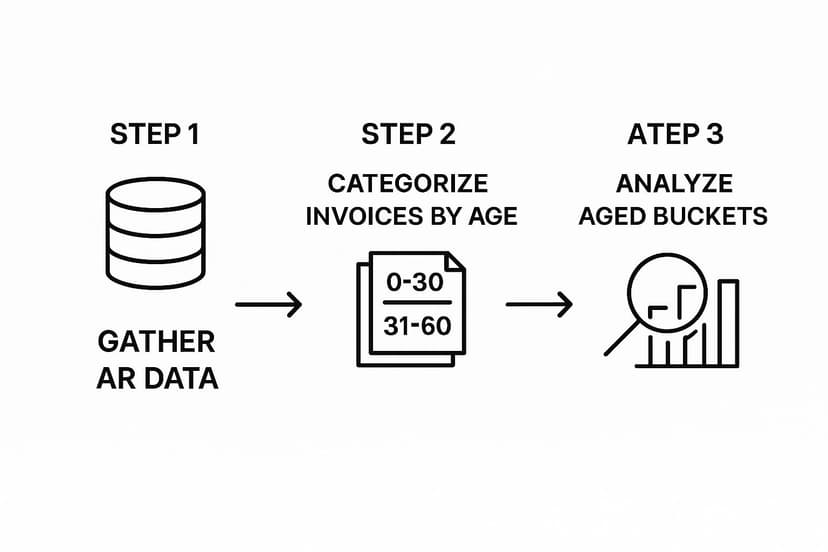
As you can see, it all starts with gathering your data. From there, we’ll sort the invoices and, finally, turn that information into real, actionable insights.
Step 1: Gather Your Essential Data
First things first, you need to get your raw data in order. Pop open a new sheet in Excel and set up a table with these core columns for every single outstanding invoice:
- Customer Name: Who owes you money.
- Invoice Number: The unique code for each bill.
- Invoice Date: When the invoice was sent out.
- Invoice Amount: The total dollar amount due.
Make sure your data is clean, with just one invoice per row. Getting this foundation right is crucial because everything else we do builds on it.
Step 2: Calculate the Age of Each Invoice
Next up, we need to figure out just how old each invoice is. This is where we’ll use our first Excel formula, and it's simpler than you think.
- Add a new column to your table and name it "Days Outstanding."
- In the very first cell of that new column, type this formula:
=TODAY()-[@[Invoice Date]]. It just subtracts the invoice date from today's date to find the age in days. - Click the small square at the bottom-right corner of the cell and drag it down to apply the formula to all your invoices.
The TODAY() function is great because it’s dynamic. Every time you open the spreadsheet, it will automatically recalculate the ages based on the current date.
Step 3: Sort Invoices into Aging Buckets
Now that we know how many days each invoice has been outstanding, it's time to group them into aging buckets. The whole point is to categorize invoices to see which ones need immediate attention. You'll typically see buckets like 0-30 days, 31-60 days, 61-90 days, and 90+ days. This method is the standard for a reason—it gives you a clear, at-a-glance view of your financial health. You can learn more about this approach from the experts at Stripe.
To set this up in Excel, we'll create new columns for each bucket and use a formula to drop the invoice amount into the right category. The IF function works perfectly here.
For your "0-30 Days" column, the formula would look something like this:=IF([@[Days Outstanding]]<=30, [@[Invoice Amount]], 0)
And for the "31-60 Days" column, you'd adjust it slightly:=IF(AND([@[Days Outstanding]]>30, [@[Days Outstanding]]<=60), [@[Invoice Amount]], 0)
Just repeat that same logic for your "61-90 Days" and "90+ Days" columns.
Here’s a look at what your final table might look like once the formulas are in place.
This setup instantly shows you where every dollar sits, giving you a clear picture of your receivables and highlighting potential problems before they get out of hand.
How to Read Your Report for Actionable Insights

Putting together an accounts receivable aging analysis in Excel is a great start, but the real magic happens when you turn those numbers into smarter business decisions. A finished report is just a snapshot in time; your interpretation is what makes it a powerful tool for boosting your financial health.
Think of it like a map. It shows you exactly where you are, but you have to know how to read the terrain to figure out where to go next.
Your goal is to look past the grand totals and really dig into how your receivables are spread across the different aging buckets. In a healthy business, the lion's share of the money owed will be sitting in the "Current (0-30 days)" column. As you look further to the right—to the 31-60, 61-90, and 90+ day columns—those amounts should get smaller and smaller. This is the pattern you want to see, as it means your collection process is humming along and customers are paying their bills on time.
Spotting the Red Flags
The true power of an aging report is its ability to wave a red flag before a small problem becomes a big one. You just need to know what to look for.
Here are the key warning signs that can signal trouble ahead for your cash flow and credit risk:
- A Bulge in Older Buckets: If a big chunk of your total receivables is stuck in the 61-90 or 90+ day columns, that's a clear sign of trouble. It often means your collection efforts aren't hitting the mark or your credit policies are too relaxed.
- A Key Customer Consistently Late: Do you have a major client whose name keeps popping up in the older columns? That's a huge risk. If that one big account goes under, it can have a massive ripple effect on your own finances.
- Balances Creeping Up Over Time: Don't just look at this month's report in isolation. Compare it to the last few. If you see a trend where more and more money is shifting into the older buckets each month, you've likely got a systemic problem that needs to be fixed, and fast.
When over 18-22% of a company's accounts receivable is older than 90 days, it's often a symptom of unhealthy financial habits. This pile-up dramatically increases the risk of bad debt because, frankly, the odds of ever collecting an invoice drop off a cliff after the 90-day mark. You can learn more about this connection by checking out these AR aging statistics.
Turning Insights into Action
Once you’ve spotted these patterns, it’s time to do something about them. Your analysis should directly fuel your strategy.
For instance, if you see a lot of invoices piling up in the 31-60 day bucket, maybe it's time to set up automated email reminders. If one particular customer is always late, it might be time for a frank conversation about their payment terms or even moving them to an upfront payment model.
You could also try offering a small discount for early payments—it's a surprisingly effective way to get cash in the door faster. This is how you transform your report from a passive summary into an active, practical guide for managing your company's money.
Bringing AI to Your AR Analysis in Excel
Building an accounts receivable aging analysis in Excel is a fantastic skill. But let's be real—doing it manually every week is a grind. It’s repetitive work that eats up time and leaves room for small formula mistakes that can cause big headaches. As your business scales and invoices pile up, what was once a manageable task can quickly become a major bottleneck.
This is exactly where bringing artificial intelligence into Excel completely changes the game. Instead of wrestling with IF formulas and manually updating data, you can generate a complete, accurate report with a single, simple instruction. AI tools integrated into Excel are built to do the heavy lifting for you, transforming a complex process into a straightforward request.
From Manual Drudgery to Instant Clarity
Picture this: you open your sales data in Excel, but instead of clicking around to build formulas, you just type what you need. With an AI add-in like Elyx.AI, you can use plain English to get the job done.
For example, you could just type:
"Create an AR aging report from my sales data, bucketed into 0-30, 31-60, 61-90, and 90+ day intervals."
In moments, the AI builds a perfectly structured table with all the calculations handled automatically. This is more than just a speed boost; it’s a smarter way to work. It eliminates the risk of human error from typos or grabbing the wrong cell, ensuring your analysis is always based on solid data. This shift frees up your team to spend less time on tedious data prep and more time on high-value strategy—like following up on overdue accounts or rethinking your credit policies. To see more of what's possible, you can dive into the basics of how to automate Excel.
Why an AI-Powered Workflow Makes a Real Difference
The benefits of weaving AI into your accounts receivable aging analysis go far beyond just saving a few hours. It brings a level of precision and efficiency that’s tough to achieve with manual methods alone. For a bigger-picture view on improving operations, this practical guide to automating business processes has some great ideas that apply to more than just finance.
To really see the contrast, let's compare the old-school manual process with a modern, AI-powered approach.
Manual vs AI-Automated AR Aging Analysis in Excel
The table below breaks down the key differences between doing things the traditional way and letting an AI tool handle the report creation.
| Aspect | Manual Excel Method | AI-Automated Method (e.g., Elyx.AI) |
|---|---|---|
| Time Investment | Hours per week spent on data entry, formula creation, and report updates. | Minutes to generate a complete report using a simple text command. |
| Accuracy | High risk of human error from incorrect formulas, typos, or missed data points. | Extremely high accuracy, as the AI handles all calculations and data sorting automatically. |
| Scalability | Becomes increasingly difficult and time-consuming as invoice volume grows. | Effortlessly handles large datasets, scaling with your business without extra work. |
| Skill Requirement | Requires intermediate to advanced Excel skills (e.g., IF, AND, TODAY()). |
No complex skills needed; if you can write a sentence, you can generate a report. |
| Focus | Primarily on data preparation and validation, leaving little time for analysis. | Shifts focus to strategic analysis and action, using the report to drive decisions. |
By automating this critical financial task, you're not just saving time; you're freeing up valuable mental energy. Your team can finally step away from being data crunchers and become strategic thinkers, using the insights from the aging report to actively improve cash flow and safeguard your company's financial health.
Common Questions About AR Aging Analysis
As you start using accounts receivable aging analysis, you're bound to have a few questions. Let's tackle some of the most common ones that pop up, so you can feel confident using this report to its full potential.
How Often Should I Run an AR Aging Report?
There's no single magic number here—it really depends on the pace of your business. A good starting point for most companies is to run the report at least once a month. This gives you a regular, predictable look at the health of your receivables.
However, if your business deals with a high volume of sales or operates on tight cash flow, running it weekly is a much better idea. Doing it weekly means you can spot a late payment almost immediately. This gives you a huge advantage, letting you jump on collections before a small hiccup turns into a major cash flow problem.
What Should I Do About Very Old Invoices?
When an invoice hits that 90+ day category, it’s a serious red flag. The odds of ever seeing that money have dropped dramatically, so it's time to act fast. Your first move should be a direct and firm follow-up. This might mean getting a senior manager involved or even having your lawyer send a formal letter.
If that doesn't work, you're left with two main paths:
- Bring in a Collections Agency: These third-party pros are experts at recovering debt. They have methods and resources that your internal team might not, and they can often get results when you can't.
- Write It Off as Bad Debt: At some point, you have to cut your losses. Writing off an uncollectible invoice is a tough pill to swallow, but it’s necessary. It cleans up your books and gives you a more honest view of your financial situation, preventing you from chasing a lost cause.
Don't let uncollectible accounts distort your data. Regularly writing off bad debt is a necessary part of financial hygiene, ensuring your aging report accurately reflects what you can realistically expect to collect.
How Does This Analysis Fit into My Overall Financial Strategy?
Think of your AR aging report as more than just a collections checklist; it’s a strategic tool. The information it gives you feeds directly into the bigger picture of your company's financial health. In fact, the data from this analysis is a cornerstone of effective small business financial reporting.
For instance, if you keep seeing the same customers paying late, it might be a sign that your credit policies are too loose. The report is also critical for forecasting cash flow, as it helps you predict how much money you’ll actually have on hand for things like payroll, inventory, or new investments. It touches everything from deciding when to hire more finance staff to figuring out which customers are worth your time and energy.
Ready to stop wrestling with manual spreadsheets and start getting instant financial insights? Elyx.AI integrates directly into Excel, allowing you to generate a complete accounts receivable aging analysis with a simple, natural language command. Save time, eliminate errors, and focus on what truly matters—making smart, data-driven decisions to grow your business. Try Elyx.AI for free today.
Reading Excel tutorials to save time?
What if an AI did the work for you?
Describe what you need, Elyx executes it in Excel.
Sign up